

Wedel IT

Custom ICA with XenApp and XenDesktop 7.x

Custom ICA with XenApp and XenDesktop 7.x

With earlier versions of XenApp (Presentation Server 4 until XenApp 6.5) we had the option to create custom ICA files to launch desktops and applications directly and bypass the Web Interface.

One tool that we could use to create these files were Citrix Quick Launch
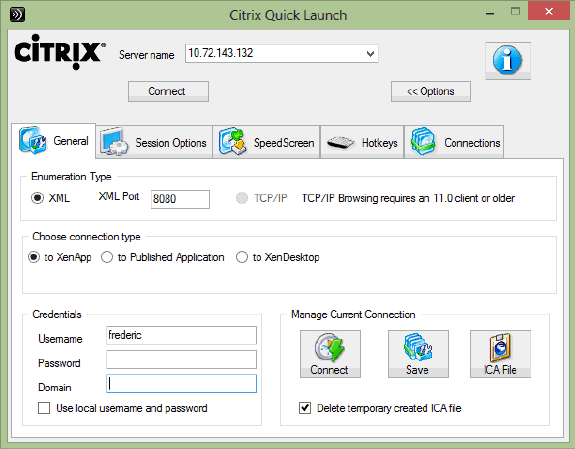
 

Although it is possible to use this tool to create an ICA file for a published Desktop in XenApp/XenDesktop 7.x, it is not possible to do so for a published application.

Luckily, there is a way to launch desktops and applications bypassing Storefront as well.

To create this file, we need an environment using Storefront and a client running Citrix Receiver.

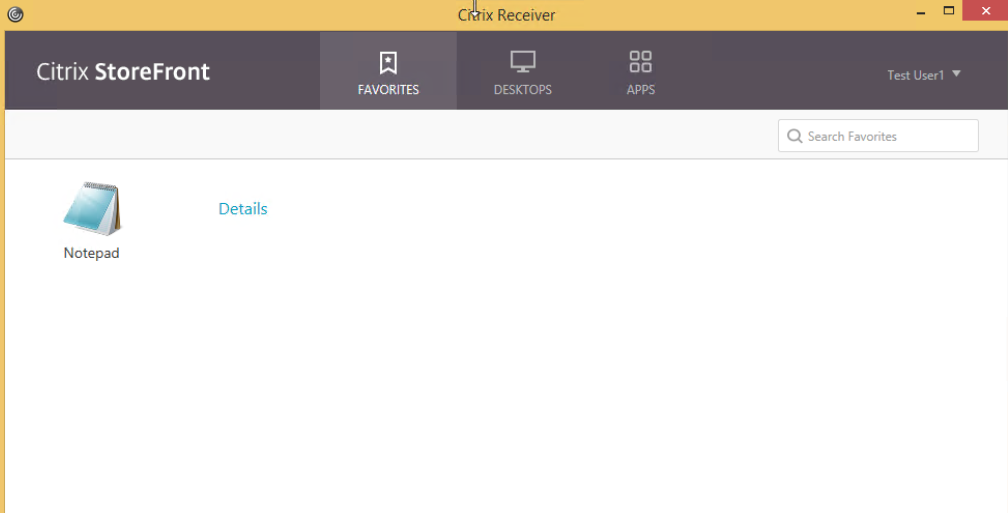
When a user is logged on a client using Citrix Receiver and puts an application in the favorite list,  a corresponding key is created in registry at;

HKEY_CURRENT_USER\Software\Microsoft\Windows\CurrentVersion\Uninstall

I have put Notepad in favorites in this example and the key got created in registry as shown in the screenshot.
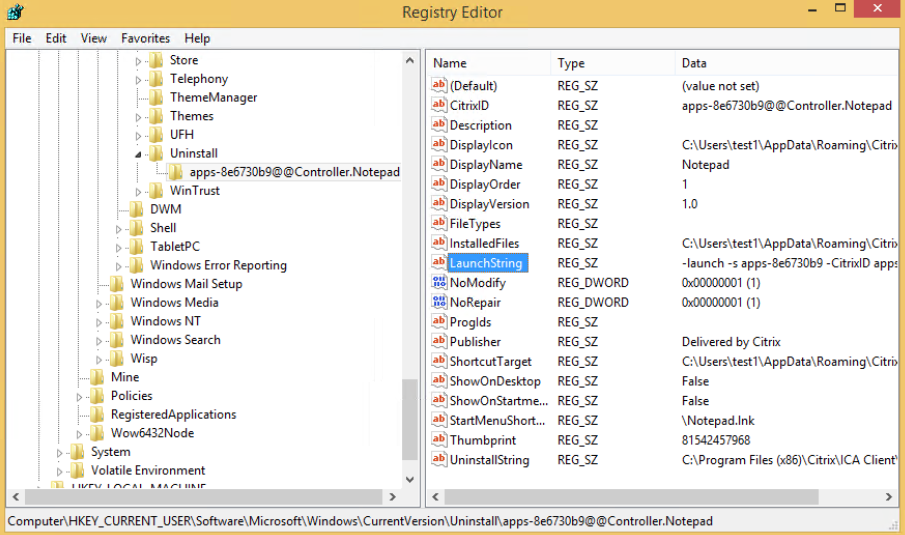


Under this key there is an object called LaunchString.

The value in this string is what we are going to use to make our “Custom ICA”

The following were shown in this example;

launch -s apps-8e6730b9 -CitrixID apps-8e6730b9@@Controller.Notepad -ica https://xxx.xxx.xxx/Citrix/Apps/resources/v2/Q29udHJvbGxlci5Ob3RlcGFk/launch/ica -cmdline

By using this command we can launch the application and bypassing the Storefront  server.

This can be used in a powershell scripts, batch files etc. using SelfService.exe that is located in the following folder “C:\Programfiles(x86)\Citrix\ICA Client\SelfServicePlugin”

A nice thing here is that this command is not user specific, but can be used by any user who has access to the application.

When the command is run, a login prompt is shown and after authentication the app is launched.

If a user who does not have access to the application tries to run the command, he  or she gets a message that the application could not be launched and that he or she should contact an administrator. The same message is shown if the application is disabled.

The only thing that has to be in place is a reciver that is configured to use the store where the application is available from. To streamline this for a user is to use the right parameters when installing Citrix Receiver.

If  the users is installing the Receiver without parameters manually, you can also send them the .cr file from Storefront server which will configure the receiver to the correct store.


Author

Mikael Modin

Twitter: @mikael_modin

Leave a Reply

Your email address will not be published. Required fields are marked *

Kristian Heggelund

Seniorkonsulent

Kontakt

Kristian Heggelund

Kristian har 15 års erfaring fra ulike IT‑roller, med særlig fokus på Microsoft‑teknologi og er sertifisert Microsoft Solution Architect Expert. Han har solid bakgrunn fra både enterprise og SMB‑miljøer, og bred kompetanse innen 
serveradministrasjon, Microsoft Endpoint Configuration Manager, applikasjonsforvaltning og skripting.

EKSPERTISE

Kontakt

Daniel er en allsidig konsulent med godt humør som liker å sette seg inn i nye løsninger og utfordringer hos kundene sine.

Han har jobbet med Citrix og EUC siden 2001.

EKSPERTISE

Bjørn-Ingar Trønnes

Seniorkonsulent

Kontakt

Bjørn-Ingar er en seniorkonsulent med 25 års erfaring fra IT-bransjen. Han har solid kompetanse innen drift, infrastruktur og skyteknologi, med særlig fokus på Nerdio og Microsoft Azure.

EKSPERTISE

Andreas Norum

Seniorkonsulent

Kontakt

Andreas er en konsulent som alltid beholder roen. Han har lang og solid erfaring med drift og implementering av store og komplekse Citrix løsninger. Han har i tillegg god kjennskap til IGEL tynnklienter og er sertifisert ICP.

EKSPERTISE

Ted Rasmussen

Seniorkonsulent

Kontakt

Ted har lang og bred erfaring med Citrix NetScaler, inkludert design, implementasjon, konfigurasjon og feilsøking av lastbalansering, gateway løsninger og sikker tilgang til applikasjoner. I tillegg solid erfaring med brannmurer, proxy-løsninger, VPN-teknologier og administrasjon av Cisco nettverkskomponenter. Kombinerer forståelse for nettverkssikkerhet og ytelse med praktisk erfaring fra komplekse og forretningskritiske miljøer.

EKSPERTISE

Kim Clausen

Seniorkonsulent

Kontakt

Kim har 30 års erfaring fra implementerings prosjekter hos store kunder som arkitekt, teknisk prosjektleder og systemkonsulent.

Han har lang erfaring med implementasjon av strategiske og taktiske løsninger og systemer for store kunder med spesielle behov.

EKSPERTISE

Robert Fjerdingstad

Seniorkonsulent

Kontakt

Robert er en løsningsorientert seniorkonsulent som liker å dykke dypt ned i komplekse problemstillinger. Han har over 15 års erfaring som IT konsulent og jobbet med EUC siden 2012.

EKSPERTISE

Alexander Smedsrud

Partner & Seniorkonsulent

Kontakt

Alexander er veldig løsningsorientert og trives godt i komplekse IT-miljøer.

Han har bred kompetanse innenfor implementasjon,drift og optimalisering av virtuelle desktopmiljøer, skyløsninger og klientadministrasjon.

EKSPERTISE

Espen Berger

Seniorkonsulent

Kontakt

Espen har lang og bred erfaring innen implementasjon av Microsoft og Citrix sine produkter siden 2002.

Han har jobbet med alt fra design og arkitektur av infrastrukturløsninger,migreringer, feilsøking og optimalisering i komplekse miljøer

EKSPERTISE

Daniel Wedel

Daglig leder og seniorkonsulent

Kontakt

Daniel er en allsidig konsulent med godt humør som liker å sette seg inn i nye løsninger og utfordringer hos kundene sine.

Han har jobbet med Citrix og EUC siden 2001.

EKSPERTISE